Retargeting ads on Facebook are your secret weapon for turning window shoppers into paying customers.Retargeting ads on Facebook are your secret weapon for turning window shoppers into paying customers. Instead of casting a wide net hoping for a bite, you’re specifically targeting people who have already interacted with your brand—whether they’ve visited your website, used your app, or engaged with your social media.
This simple shift means you’re focusing your ad spend on a warm audience, which almost always leads to dramatically higher conversion rates and a much healthier return on ad spend (ROAS).
Why Retargeting on Facebook Delivers Unmatched ROI
Let's cut right to it. Retargeting isn't just another line item in your marketing budget; for many businesses, it's the single most profitable part of their entire ad account. Why? Because you're not shouting into the void trying to attract complete strangers. You're re-engaging people who have already raised their hand.
This "warm" audience is your biggest growth lever. They've already clicked through to your site, watched a video, or even added a product to their cart. They know who you are. That initial hurdle of building awareness and trust is already cleared, which is half the battle in advertising.
From Hesitant Shoppers to Loyal Buyers
For an e-commerce brand, retargeting is what transforms a one-time visitor into a repeat customer. It’s your chance to remind them about the products they browsed, maybe answer a common question with a testimonial ad, or offer a small discount to nudge them over the finish line.
The same logic applies to B2B. A casual blog reader can become a qualified lead when you retarget them with a relevant case study or an invitation to a webinar that solves their exact problem.
The numbers don't lie. Industry benchmarks consistently show that retargeted users are a whopping 3x more likely to click on an ad compared to people who've never heard of you. That spike in engagement translates directly into lower acquisition costs.
Retargeting vs Prospecting Performance Snapshot
To put it in perspective, let's look at how a typical retargeting campaign stacks up against a prospecting (cold audience) campaign.
| Metric | Prospecting Campaigns (Cold Audience) | Retargeting Campaigns (Warm Audience) |
|---|---|---|
| ROAS | Often 1x-2x, sometimes lower | Typically 3x-10x+ |
| CTR | Usually below 1% | Often 2%-5% or higher |
| CPA/CPL | Higher, establishes baseline cost | Significantly lower, often 40-60% less |
| Conversion Rate | Lower, focused on awareness | Much higher, focused on action |
This table isn't just theory; it reflects what we see in ad accounts every day. While prospecting is essential for growth, retargeting is where you maximize profitability and efficiency. One analysis even found that well-segmented retargeting campaigns can boost conversions by a staggering 345%.
The core principle is simple: it’s far easier and cheaper to convert someone who already knows you than someone who doesn’t. Retargeting ads on Facebook formalize this follow-up process at scale.
The Foundation for Success: The Meta Pixel
So, how does this magic happen? It all starts with a solid data foundation. The engine powering every effective retargeting campaign is the Meta Pixel—a small snippet of code you place on your website.
This pixel acts like a digital hand-raiser, tracking what visitors do on your site. This allows you to build powerful Custom Audiences based on specific actions, like "viewed a product page in the last 14 days" or "added an item to their cart but didn't buy."
Getting your pixel set up correctly is the first real step to mastering your advertising funnel and maximizing your return on ad spend. We'll dive deep into setting this up in the next section.
Laying Your Data Foundation with the Meta Pixel
Great retargeting isn't built on slick ad copy or flashy creative alone. It’s built on a rock-solid foundation of clean, reliable data. The entire technical backbone of your retargeting operation is the Meta Pixel—a small snippet of code you install on your website that acts as your eyes and ears, logging visitor activity and sending it all back to Meta.
Think of the Pixel as a digital scout. It quietly notes who lands on your site, which pages they browse, and what actions they take. Before you can even think about building powerful Custom Audiences, you need a way to track website visitors, and that’s exactly what the Pixel is for.
Getting the Pixel installed is usually the easy part, especially with modern website platforms. Most e-commerce and site builders have simple, one-click integrations that take the headache out of the process:
- Shopify: The native integration is a breeze; you just need to paste your Pixel ID into the right field.
- WordPress: Plugins like PixelYourSite or the official Facebook for WordPress plugin can get you up and running in minutes.
- Google Tag Manager (GTM): For more complex sites or those who want granular control, GTM is the way to go. It lets you deploy the Pixel and manage all your events without ever touching the site's code directly.
Identifying and Tracking the Actions That Matter
Once the Pixel is live, the real work begins. You need to tell Meta which user actions are important to your business by setting up Standard Events. Don't just settle for tracking page views. You want to zero in on high-intent actions that signal someone is moving from a casual browser to a potential customer.
For an e-commerce store, the money-making events are pretty clear:
- ViewContent: Someone is checking out a specific product page.
- AddToCart: A huge signal of interest—they've put something in their basket.
- InitiateCheckout: They’re serious now and have started the payment process.
- Purchase: The finish line. This is your most valuable conversion.
If you're a B2B service, your key events might look a little different. Think CompleteRegistration for a webinar sign-up or a Lead event when someone fills out your contact form. Tracking these specific actions is what unlocks the ability to build incredibly relevant retargeting audiences later. We’ve got a full walkthrough in our guide on how to set up the Facebook Pixel that dives deep into configuring these events.
The Conversions API Is No Longer Optional
In the last few years, relying solely on browser-based tracking (like the Pixel) has become a risky game. With iOS updates, ad blockers, and cookie restrictions, a lot of data gets lost in translation. This is where the Conversions API (CAPI) steps in.
CAPI works hand-in-hand with the Pixel, but it sends data directly from your server to Meta's server.
This server-to-server connection is far more durable and helps plug the data gaps created by browser-side tracking issues. Honestly, implementing CAPI is no longer a "nice-to-have"—it's an absolute must for building complete, accurate audiences and ensuring your ads actually reach the people you intend them to. It helps you reclaim lost attribution data, making your campaign reports infinitely more reliable.
Building Retargeting Audiences That Actually Convert
This is where most advertisers either strike gold or burn through their budget. Moving past the generic "all website visitors" list is the first real step toward building profitable retargeting ads on Facebook. The magic isn't in targeting everyone who has visited your site—it's in strategic segmentation.
You have to carve out smaller, highly motivated groups of people based on the specific actions they took. The goal is to create Custom Audiences so specific that your ad feels less like an interruption and more like a genuinely helpful reminder. This is how you re-engage users with precision and turn passing curiosity into actual conversions.
Segmenting by Intent and Behavior
Start by thinking about the user's mindset. Someone who visited your pricing page is showing far more buying intent than someone who just skimmed a single blog post, right? Your audience strategy has to reflect that difference.
Here are a few powerful, high-intent audience segments you can build today:
- Top 25% of Website Visitors by Time Spent: These are your super-users. They’ve spent significant time exploring what you offer and are prime candidates for a direct offer or a compelling testimonial ad.
- Pricing Page Visitors (Who Didn't Convert): This group is on the fence, actively evaluating your product. An ad that tackles common objections or highlights a key value proposition can be incredibly effective here.
- Video Viewers (Watched 75% or 95%): Anyone who watches almost your entire video is clearly interested. Hit them with the next logical step, whether that's a product demo, a related video, or a straight-up call-to-action.
The Meta Pixel is what makes all of this possible. It captures website data and sends it back to Facebook, allowing you to build these incredibly specific audiences.
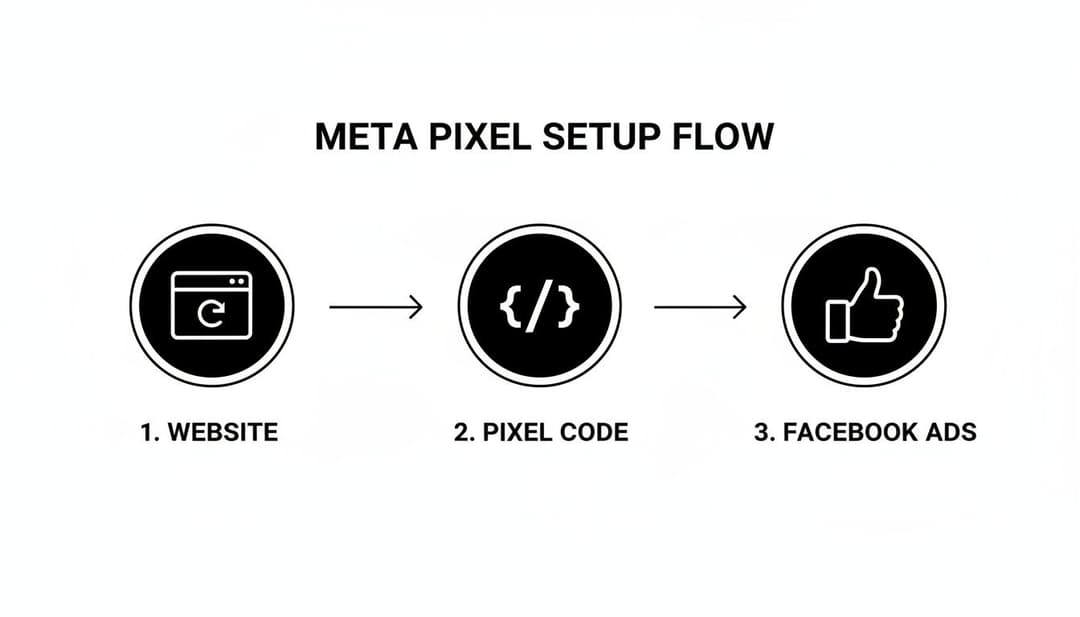
This simple data connection is the engine that powers every high-performing retargeting campaign I've ever run.
High-Impact Audiences for E-commerce and B2B
For an e-commerce store, your most valuable segment is almost always the cart abandoners. Create an audience of users who triggered the AddToCart event but not the Purchase event in the last 7-14 days. These are your hottest leads, and a simple ad with a gentle nudge—or maybe a small incentive—can recover a huge amount of otherwise lost revenue.
In the B2B world, I’d focus on users who hit a "Request a Demo" page but didn't submit the form. Retarget them with a solid case study or a quick video explaining the benefits of seeing a demo. It often works wonders to re-engage their interest.
Because these users already know your brand, they are up to 70% more likely to complete a purchase when they see a retargeting ad. In one SaaS campaign I worked on, this exact kind of segmented retargeting drove a 345% jump in conversions. The proof is in the performance.
Key Takeaway: Stop targeting everyone. Build small, hyper-relevant audiences based on high-intent actions. The more specific your audience, the more resonant your ad will be—and the less you'll waste on people who were never going to buy anyway.
The Crucial Role of Exclusion Audiences
Just as important as who you target is who you exclude. Showing purchase-focused ads to people who just bought from you isn't just a waste of money; it's a terrible experience for your new customers.
Always create exclusion audiences to keep your targeting sharp. A few essential exclusions include:
- Recent Purchasers (Last 30-60 Days): Exclude them from your general sales campaigns. You can always target them later with upsell or cross-sell offers.
- New Leads (Last 30 Days): If someone just filled out a contact form, take them out of your top-of-funnel ads designed to generate leads.
- Existing Customers: For any campaign focused purely on new customer acquisition, upload your customer list and exclude it entirely.
By implementing smart exclusions, you protect your budget, improve the customer journey, and ensure your campaign metrics are actually telling you the truth. For a deeper dive, check out our guide on creating powerful Facebook Ads Custom Audiences to learn more advanced segmentation techniques.
Creating Ads That Re-Engage and Inspire Action
Once you have your audiences neatly segmented, it's time to craft the actual retargeting ads on Facebook that will speak to them. This isn't a cold audience; these people already know who you are. Your creative and copy must reflect that existing relationship to have any chance of working. A generic, one-size-fits-all ad just feels lazy to someone who is already on the verge of converting.
Your approach has to be dialed into each segment's specific intent. For someone who bailed on their shopping cart, Dynamic Product Ads are your absolute best friend. These ads are brilliant because they automatically pull in the exact products a user was looking at or added to their cart, creating a hyper-relevant and powerful reminder. It’s personalization at scale, putting what caught their eye right back in front of them.

Tailoring Your Message to the Moment
The copy for your retargeting ads should feel less like an ad and more like the continuation of a conversation. Acknowledge their previous visit with a friendly nudge. Simple phrases like, "Still thinking it over?" or "Ready to take another look?" can make all the difference. It shows you're paying attention and makes the ad feel more like a helpful reminder than a hard sell.
For users who browsed a service page but didn't take the next step, your ad needs to build confidence. This is the perfect opportunity to hit them with powerful testimonials, compelling case studies, or user-generated content that proves your value. The goal here isn't just to remind them you exist—it's to dismantle whatever hesitation is holding them back with a dose of social proof. Of course, the creative assets themselves are a huge piece of the puzzle; you can explore different social media content creation tools to help design visuals that stop the scroll.
A great retargeting ad doesn’t just re-show a product; it answers the unasked question the user had before they left your site. It addresses their friction points, whether that’s price, trust, or timing.
Fighting Ad Fatigue with Creative Rotation
Ad fatigue is the silent killer of profitable retargeting campaigns. It's inevitable. When a warm audience sees the same ad over and over, they start to tune it out. Your click-through rates will tank, and your costs will creep up.
To get ahead of this, you need a solid creative rotation. On average, you might see a CTR of around 1.55%, but retargeting blows that away since warm users are known to click 3x more often. To keep those clicks coming, I always recommend rotating 3-5 unique creatives at least every two weeks. This simple tactic helped one of my clients slash their MQL costs by 50% while simultaneously driving a 345% boom in conversions. It works.
A simple rotation strategy might look something like this:
- A graphic featuring a strong user testimonial.
- A short, punchy video demonstrating the product in action.
- A clean static image that highlights a key benefit.
- A carousel ad that walks through different use cases or features.
By cycling through different ad formats and angles, you keep the experience from getting stale. More importantly, you get to test which messages and visuals actually resonate with each audience segment.
Another powerful technique is creative sequencing. This is where you tell a story over a series of ads. The first ad might just be a simple reminder of the product. A few days later, they see an ad with a customer review. Finally, you might hit them with a limited-time offer. This narrative approach guides them back toward your site without just shouting the same thing at them repeatedly. If you're looking for more ideas, check out our guide on designing creative ad campaigns.
Optimizing and Scaling Your Retargeting Campaigns
Getting your retargeting campaigns live is a huge milestone, but the real work starts now. This is where the magic happens—the ongoing process of smart tweaks and strategic scaling that can turn a good campaign into an absurdly profitable one. Your goal is simple: maximize your Return on Ad Spend (ROAS) without annoying your audience or just plain burning through cash.
It all starts with picking the right bidding strategy. Meta Ads Manager gives you a few options, but for retargeting, it really just comes down to two main choices.
Bidding Strategies for Warm Audiences
The "Highest Volume" bidding strategy (which you might remember as "Lowest Cost") is pretty straightforward. You're telling Meta to get you the most conversions it possibly can for your daily budget. It’s aggressive and works beautifully for smaller, highly motivated audiences—think people who abandoned their cart in the last 7 days. These folks are on the verge of buying, so you just need to get in front of them and close the deal.
On the flip side, the "Cost Per Result Goal" strategy puts you in the driver's seat. Here, you tell Meta the maximum you're willing to pay for a conversion, and its algorithm works to hit that average. This is your go-to for larger, broader retargeting audiences, like everyone who visited your website in the last 90 days. It acts as a safety net, preventing your costs from getting out of hand as you reach people who are less engaged, which keeps your campaigns profitable over the long haul.
Interpreting Key Metrics for Smart Decisions
Once your campaign is running, you have to know which numbers actually matter. Don't get lost staring at your click-through rate; for retargeting, there are two metrics that tell you almost everything you need to know.
- Frequency: This shows you the average number of times each person has seen your ad. If this number creeps above 3-4 per week, you’re entering the danger zone of ad fatigue. High frequency is a classic sign that your audience is too small for your budget, and you're just spamming them.
- ROAS (Return on Ad Spend): This is the bottom line. It’s the clearest measure of profitability, telling you exactly how much money you’re making for every dollar you spend. Keep a close eye on your ROAS to make sure your campaigns are actually helping your business grow.
The secret to great optimization is treating your campaign like a living, breathing thing. You have to check in, see what the data is telling you, and make adjustments. Don't just set it and forget it. Active management is what separates break-even campaigns from the ones that print money.
A Framework for Profitable Scaling
When you’ve got a winning ad set that’s crushing it, the temptation is to crank up the budget. But how you scale is just as important as when. There are two proven ways to scale your successful retargeting ads on Facebook.
The first is vertical scaling. This just means you gradually increase the budget on the ad set that’s already working. A safe rule of thumb is to raise the budget by no more than 20-30% every 48-72 hours. This slow-and-steady approach lets Meta’s algorithm adjust without throwing it back into the learning phase, so you can increase your spend without killing your performance.
The second method is horizontal scaling. Instead of pouring more money into one ad set, you duplicate your winner and target a new, similar audience. For example, if your "Cart Abandoners (7 Days)" campaign is a hit, you could duplicate it and aim it at people who "Viewed Content But Didn't Add to Cart (14 Days)." This lets you expand your reach with a creative and message you already know works. Knowing the right way to expand your reach is key, and you can learn more about how to scale Facebook ads in our more detailed guide.
Common Facebook Retargeting Questions Answered
Even with a solid strategy, you're going to hit roadblocks and have questions pop up when you're in the trenches running retargeting ads on Facebook. Getting straight answers to these common sticking points can save you time, money, and a whole lot of frustration. Let's tackle some of the most frequent questions I hear from marketers.
One of the first hurdles is just knowing when you have enough people to target effectively. I've seen a lot of people rush to launch with a tiny audience, and it's almost always a recipe for high ad fatigue and wasted spend. It's all about finding that sweet spot between audience size and campaign efficiency.
How Large Should My Retargeting Audience Be?
There's no single magic number, but a good rule of thumb is to wait until your source audience—whether that’s website visitors, video viewers, or another group—has at least 1,000 people. This gives Meta's delivery algorithm enough data to work with, letting it find the right users at the right time without bombarding them with your ads.
Now, for those smaller, high-intent segments like cart abandoners, you can sometimes get away with starting with just a few hundred people. But if you go this route, you have to monitor your metrics like a hawk. Be prepared to refresh your ad creative a lot more often, and don't be surprised if performance fluctuates.
What Is a Good Frequency for Retargeting Ads?
Frequency is the metric that tells you, on average, how many times a person has seen your ad. You really want to keep this between 3-4 impressions per user each week. If you see this number creeping much higher, consider it a major red flag.
High frequency is the number one killer of ad performance. It’s a clear signal that your audience is too small for your budget, your campaign has been running too long without a refresh, or your creative has gone stale. This leads to negative feedback from users, rising costs, and a nosedive in your returns.
Why Is My Retargeting Campaign Not Delivering?
It’s one of the most maddening problems in advertising: you’ve built the perfect audience and creative, hit launch, and... crickets. Your campaign is barely spending a dime. When this happens, it usually boils down to a few common culprits that you can troubleshoot one by one.
Start by digging into these key areas:
- Audience Size: This is the most common issue. If your audience is too small (under that 1,000-person mark), Meta's system may simply struggle to find enough active users to deliver your ads consistently.
- Bid or Cost Cap: Setting your bid or cost cap too low is another classic mistake. If your target is unrealistic for what the ad auction currently demands, you'll just get outbid, and your ads won't serve.
- Ad Policy Violations: It doesn't take much. Even a minor policy violation can severely limit—or completely stop—your ad's reach. Double-check your ad creative, copy, and landing page against Meta's advertising policies.
- Audience Overlap: Are you running multiple ad sets targeting similar or overlapping audiences? If so, Meta's system can get confused, causing one ad set to get all the priority while the other one stalls out.
By methodically working through these potential issues, you can almost always find the bottleneck and get your campaign back on track and delivering results.
Ready to stop the guesswork and scale your Meta campaigns with confidence? AdStellar AI automates ad creation, identifies winning combinations, and helps you launch high-performing campaigns 10x faster. Learn how AdStellar AI can transform your advertising workflow.