You launch a new page, paste the URL into Facebook, and the post preview undermines the work in seconds. The image is wrong. The headline gets truncated. The description is empty or generic. Instead of driving qualified clicks, the post looks careless.
That problem usually gets treated like a minor social formatting issue. It isn't. If you're trying to share website to facebook in a way that effectively supports traffic, CTR, and downstream conversion quality, the preview is part of the campaign.
Why Your Facebook Shares Need a Strategy
Facebook sharing is still treated as an afterthought by many teams. They finish the page, grab the link, post it, and hope distribution happens on its own. That approach wastes reach because Facebook isn't just a place where links appear. It's a major traffic environment with its own rules, visual conventions, and click behavior.
In March 2024, Facebook.com recorded approximately 16.6 billion web visits, and the platform had nearly three billion monthly active users as of Q3 2023, according to Statista's Facebook traffic data. That scale is why a shared website link can still matter to growth teams even when most of the attention goes to paid media.
A broken preview doesn't just look bad. It lowers trust before the click. If the image feels random or the title reads like raw CMS output, people assume the landing page will be equally sloppy.
Practical rule: Treat every Facebook share like a lightweight ad unit. The thumbnail, title, description, and post copy all shape click quality before your page loads.
This matters even more when you're using Facebook as a bridge between organic distribution and paid amplification. A clean share tells you whether the page itself is compelling before you spend budget behind similar creative. Teams building a broader Facebook strategy for marketing usually get more value when they make organic shares measurable instead of incidental.
The good news is that Facebook sharing is more controllable than often perceived. You can shape the preview, test the message, validate how Facebook reads the page, and track whether those clicks turn into engaged sessions and conversions. That shifts the channel from "post and pray" to something you can optimize.
The Foundation Manual Website Sharing on Facebook
The simplest way to share website to facebook is still the standard link post. Copy the full page URL, paste it into the status field, and let Facebook pull the preview. This works on desktop and mobile, and it's still the baseline format every marketer should get right before trying workarounds.
How the manual process works
On desktop, open your profile, Page, or group composer and paste the URL directly into the post box. Facebook will fetch the page data and create a link card with an image, title, and description. After the preview loads, add your post copy above it.
On mobile, the flow is similar. Paste the link into the composer, wait for the preview to populate, then write the surrounding context. If Facebook doesn't generate the preview immediately, give it a moment before you publish.
A simple workflow keeps this clean:
- Paste the full URL first so Facebook can fetch the page.
- Wait for the preview to render before editing anything else.
- Write a short context line above the preview that frames the click.
- Check the image quality before posting.
- Publish only after the card looks intentional.
Why the standard preview usually wins
Many marketers try to outsmart the format by uploading a separate image and dropping the link into the text. It feels more flexible, but it usually performs worse if the goal is site traffic.
According to Jon Loomer's analysis of Facebook link posts, based on Facebook's internal research, standard link previews receive double the link clicks compared to posts where a photo is uploaded and the link is placed in the text. The same analysis notes that the preview image should be at least 600px wide for stronger visibility.
That distinction matters. A photo post can attract likes, but if users tap the image instead of the URL, you don't get the visit. The standard preview makes the destination obvious. That clarity tends to improve click intent.
If the objective is traffic, don't hide the link inside a photo post. Use the format built for outbound clicks.
There's also a workflow advantage. A proper link preview creates consistency across Facebook and other sharing surfaces. It gives you one controlled representation of the page instead of improvising creative every time someone posts it manually.
If your broader content workflow spans multiple channels, this manual link-post habit also pairs well with a more coordinated publishing process, especially when you're planning cross-post timing across Instagram and Facebook publishing workflows.
Manual sharing is easy. Control is the harder part. Facebook can only build a good preview if your page gives it the right instructions.
Controlling the Share with Open Graph Tags
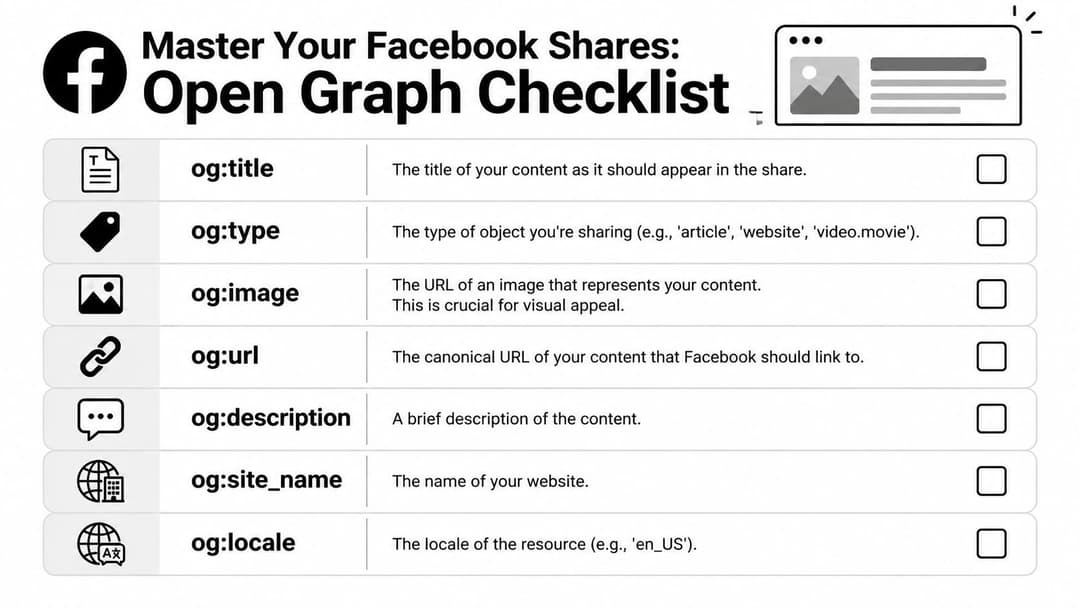
Facebook doesn't guess your preview from scratch. It reads metadata from the page. The core system is Open Graph, often shortened to OG tags. These tags tell Facebook what title, description, image, and URL it should use when someone shares your page.
That makes Open Graph a performance tool, not just a developer detail. If you want predictable previews, cleaner branding, and stronger click intent, these tags are where control starts.
Since around 2010, tools like SharedCount have helped marketers measure share activity, which shows this has been an operational concern for well over a decade. That history is part of why Open Graph remains central to measurable social distribution, as reflected by SharedCount's long-running share analytics tools.
The tags that matter most
At minimum, most pages you plan to share should include these tags in the <head> section of the HTML:
<meta property="og:title" content="Your page title for Facebook" />
<meta property="og:description" content="A short summary that gives people a reason to click." />
<meta property="og:image" content="https://www.example.com/images/share-image.jpg" />
<meta property="og:url" content="https://www.example.com/page-url/" />
<meta property="og:type" content="article" />
<meta property="og:site_name" content="Your Brand Name" />
<meta property="og:locale" content="en_US" />
Each one has a specific job.
- og:title controls the headline shown in the preview. This isn't always identical to your on-page H1. It should be clear, readable, and useful out of context.
- og:description supports the title. Facebook may not always emphasize it equally, but it still helps define the page and can improve the quality of the preview.
- og:image is often the make-or-break element for scroll stopping.
- og:url tells Facebook which canonical page this share represents, helping avoid fragmented engagement across duplicate URL variants.
- og:type, og:site_name, and og:locale round out the metadata so Facebook interprets the page correctly.
Essential Open Graph Tags for Facebook
| OG Tag | Purpose | Best Practice |
|---|---|---|
og:title |
Sets the preview headline | Write it like ad copy, clear first, clever second |
og:type |
Defines the content type | Use a value that matches the page, such as article or website |
og:image |
Supplies the share image | Use a high-quality branded image that reads well on mobile |
og:url |
Declares the canonical URL | Use the preferred final page URL consistently |
og:description |
Adds supporting context | Keep it concise and aligned with the landing page message |
og:site_name |
Shows the brand or site name | Use your recognized brand name |
og:locale |
Identifies language and region | Set it to the correct locale, such as en_US |
What good OG implementation looks like
The best Open Graph setup doesn't mirror the page mechanically. It adapts the page for the feed environment.
A product page headline might work well on-site but underperform in a share card if it's too technical. A blog article title might need a tighter phrasing for Facebook, where users scan fast and decide even faster. Your OG title should preserve accuracy while earning the click.
The image matters just as much. Use a graphic that still makes sense when cropped small on mobile. Avoid cluttered text, low contrast, and screenshots that depend on tiny interface details. If the thumbnail can't communicate the page's topic quickly, CTR will suffer even if the page itself is strong.
The page and the preview serve different jobs. The page closes the conversion. The preview earns the visit.
Common mistakes that hurt results
A lot of bad previews come from a short list of preventable issues:
- Missing OG image causes Facebook to pull a random asset from the page.
- Generic OG title creates a preview that looks like system output, not marketing.
- Mismatched messaging lowers trust when the preview promises one thing and the landing page opens with another.
- Inconsistent URLs split social proof and make debugging harder.
If you work with developers, the request should be specific. Ask for editable OG fields at the page level, not just one default site-wide setup. That lets content teams shape the preview for campaign pages, blog posts, and product launches without engineering support every time.
How to Use the Facebook Debugger for Perfect Previews
Even with good Open Graph tags in place, Facebook may still show the wrong preview. That's usually a caching issue. Facebook scraped the page earlier, stored the result, and hasn't refreshed it yet.
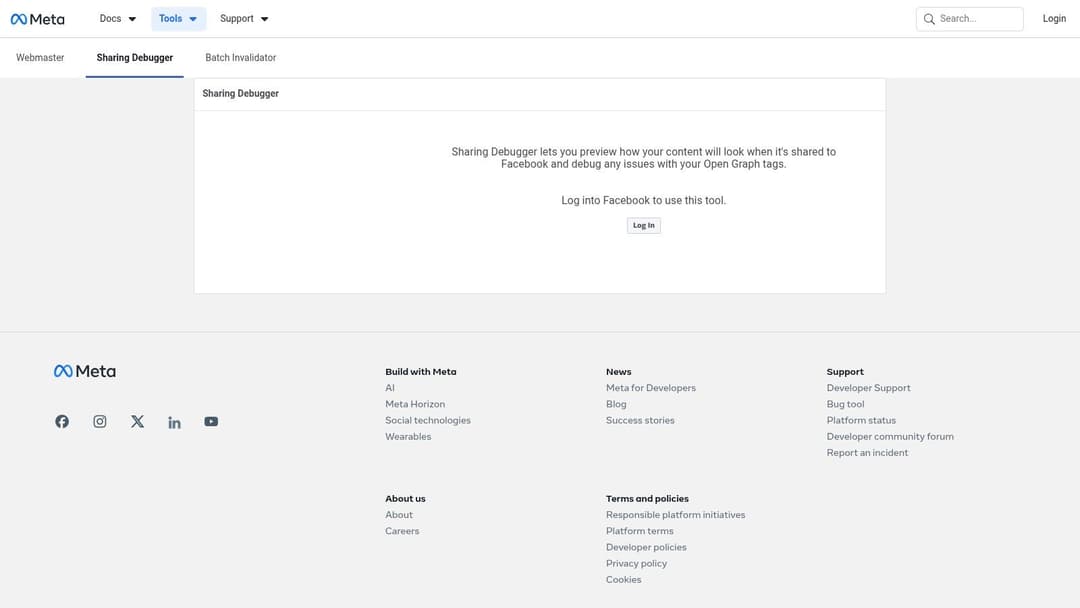
The tool that fixes this is the Facebook Sharing Debugger.
The core workflow
Go to the debugger, paste in the exact page URL, and inspect what Facebook sees. You're looking for three things: whether the page is reachable, whether the OG tags are present, and whether the preview matches your intended image and copy.
If Facebook shows an old image or outdated text, use the scrape function again. That prompts Facebook to fetch the page again and refresh the cached preview.
A practical sequence looks like this:
- Publish or update the page with the correct OG tags.
- Open the Debugger and paste the final live URL.
- Review the fetched data for title, description, image, and warnings.
- Click Scrape Again if Facebook is still showing stale content.
- Repeat after major edits to confirm the cache has updated.
If you're troubleshooting creative before launch, a dedicated Facebook ads preview tool workflow also helps catch presentation issues before they become campaign problems.
What warnings usually mean
Most debugger warnings aren't catastrophic, but they do tell you where quality slips in.
A missing og:image warning means Facebook had to improvise. A canonical mismatch means you're giving Facebook more than one version of the page to interpret. If the fetched image is technically valid but visually wrong, the debugger confirms the issue is your metadata choice, not Facebook randomness.
Don't trust the page source alone. Trust what Facebook actually scraped.
One reason marketers get stuck here is that they verify the HTML, see the right tags, and assume the preview should already be fixed. The debugger closes that gap by showing the live interpretation on Facebook's side.
For a walkthrough of the interface in action, this short video is useful:
When the debugger doesn't solve it immediately
Sometimes the page updates but the preview still looks wrong for a while. In practice, that usually points to one of these issues:
- The wrong URL version was scraped such as parameters, trailing slash variants, or HTTP versus HTTPS.
- The image file changed without a new file name so another cache layer still serves the old asset.
- The CMS hasn't published the metadata update consistently across the live page.
In those cases, verify the exact live URL, confirm the image URL itself is updated, and scrape the final canonical URL again. Most preview problems come down to version control, not mystery.
Adding a Facebook Share Button to Your Website
A share button feels like an obvious win. Make sharing easier, get more shares, get more traffic. That's the assumption. It isn't always right.
The tactical question isn't just how to add a Facebook share button. It's whether the button belongs on that page at all.
Two ways to implement a share button
The lightest option is a simple share URL. A user clicks a button or text link, and Facebook opens a share dialog with the page URL prefilled. This approach is straightforward and usually avoids the weight of a full social integration.
The more integrated option is Facebook's SDK-based Share Dialog. That can provide a more native implementation, but it adds complexity and may introduce more script overhead depending on how the site is built.
For many marketing sites, the lightweight route is enough:
<a href="https://www.facebook.com/sharer/sharer.php?u=https://www.example.com/page-url/" target="_blank" rel="noopener">
  Share on Facebook
</a>
If you're evaluating more embedded social functionality, it's worth understanding how authentication layers work before adding third-party integrations. A good primer on that is this OAuth authentication overview.
The performance trade-off most teams miss
Social buttons often look harmless in wireframes and become expensive in production. They can add scripts, slow the page, and clutter high-intent layouts.
According to Swift Growth's analysis of social sharing images and buttons, one major government site saw shares via buttons on only 0.2% of pageviews, and the broader analysis notes that social sharing scripts can slow pages and potentially hurt conversion rates. It also cites A/B tests where removing buttons increased traffic because users shared links directly instead.
That matches what performance teams often see in practice. Users who want to share useful content don't always need a visible button. They copy the URL, paste it into Facebook, and add their own context.
Where share buttons make sense
A share button can still be valuable on the right page type.
- Editorial pages: Guides, reports, and opinion pieces often benefit more than transactional pages.
- Resource hubs: If the content is reference-worthy, reducing friction can help.
- Campaign assets built for advocacy: When the goal is distribution rather than immediate conversion, a share action is easier to justify.
Where they usually don't
On sales pages, checkout flows, and conversion-focused landing pages, share buttons often distract from the primary action. They can also introduce visual noise at the exact moment you want focus.
A share button is not a default element. It's a distribution choice with a speed cost and a conversion cost.
A cleaner alternative is to skip the button, keep the OG setup strong, and let users share the page naturally. That often produces better page performance and cleaner intent on high-value funnels.
Best Practices to Maximize Clicks and Engagement
Once the technical setup is stable, the work shifts to creative and distribution choices. At this point, Facebook sharing stops being a formatting task and starts behaving like channel optimization.
The biggest mistake is treating the shared preview as static metadata. It should be written and designed with the same discipline you'd apply to ad creative.
Write OG copy for clicks, not for completeness
Your og:title should do one job first. Earn the click. That usually means leading with the outcome, problem, or hook instead of defaulting to brand-heavy naming.
Your og:description should support the promise without sounding inflated. If the preview overpromises and the landing page opens weakly, you'll get lower-quality traffic even if clicks look acceptable.
A few practical rules help:
- Lead with relevance: State what the page helps someone do or understand.
- Avoid vague cleverness: Curiosity works only when the topic is still clear.
- Match the landing page: The preview and page opening should feel connected.
Use images that survive the feed
The best og:image isn't always the prettiest asset from the design team. It's the asset that still communicates at feed size on mobile. Strong contrast, a clear focal point, and minimal clutter usually outperform detailed layouts.
If you're sharing video content, the same logic applies to thumbnails and packaging. For teams adapting long-form content into feed-ready distribution, these best YouTube video sharing strategies are useful because they focus on presentation choices that improve click intent rather than just posting mechanics.
Balance link posts with native content
There's a strategic trade-off many marketers ignore. Link posts drive traffic, but Facebook tends to reward content that keeps people on-platform. According to expert analysis in Jon Loomer's two-step funnel discussion, posts without external links can generate more than double the engagement rate of linked posts because Facebook prioritizes on-platform dwell time.
That doesn't mean you should stop posting links. It means your content mix matters.
A practical rhythm often works better than constant link dumping:
- Native post first: Publish a strong idea, observation, clip, or carousel that builds engagement.
- Link post selectively: Share the page when the asset is worth the click.
- Repurpose the angle: Use one message for engagement and another for traffic.
The feed doesn't reward your business goal automatically. You have to package the same asset differently for engagement and for visits.
Track the traffic properly
If you want measurable results, add UTM parameters to the URLs you share. That gives you cleaner attribution inside analytics tools and helps separate Page traffic, team member shares, group distribution, and creator partnerships.
This also lets you compare click volume with post-click quality. A share that drives fewer visits can still be stronger if those sessions are more engaged and convert at a higher rate. If you're pairing organic link distribution with paid boosts later, that same discipline carries into Facebook post promotion workflows.
Frequently Asked Questions About Facebook Sharing
Why isn't my Facebook preview updating after I fixed the page
Usually because Facebook is still using a cached version of the URL. Run the page through the Sharing Debugger again and confirm you're scraping the exact canonical URL. If the image itself was replaced without changing the file path, another cache layer may still be serving the old asset.
Can people choose a different image when they share my page
Sometimes users may see different behavior depending on context, but you shouldn't rely on manual image selection. The reliable way to control the preview is to set the right og:image on the page and verify that Facebook scraped it correctly. If the image matters to CTR, control it in metadata rather than hoping users pick the right one.
Should I share to a Facebook Page or a Group
It depends on the role of the share. A Page is better when you want consistent brand publishing, reusable reporting, and a clean content archive. A Group can work well when the discussion context is strong and the link is useful to that community.
The important part is intent. A Page post is distribution. A Group post is participation. If the group audience expects discussion, write the post for discussion first and link second.
For teams that also work with creators or community-led campaigns, broader influencer marketing social engagement strategies can help frame when conversational distribution beats direct promotional posting.
Are Facebook share buttons worth adding everywhere
No. High-intent commercial pages usually need focus more than social utility. Educational and reference-style content often benefits more from share affordances, especially when readers are likely to pass the link along.
What's the single biggest mistake when trying to share website to facebook
Letting Facebook build the preview from incomplete metadata. Once the wrong image or weak title appears, you've already lowered the odds of a good click. Clean OG tags and debugger checks prevent most of the avoidable damage.
If your team wants to move beyond manual testing and scale Meta execution faster, AdStellar AI helps you launch, test, and optimize campaigns with less setup friction. It connects to your Meta Ads Manager, learns from historical results, and helps turn winning creative patterns into repeatable campaign execution.